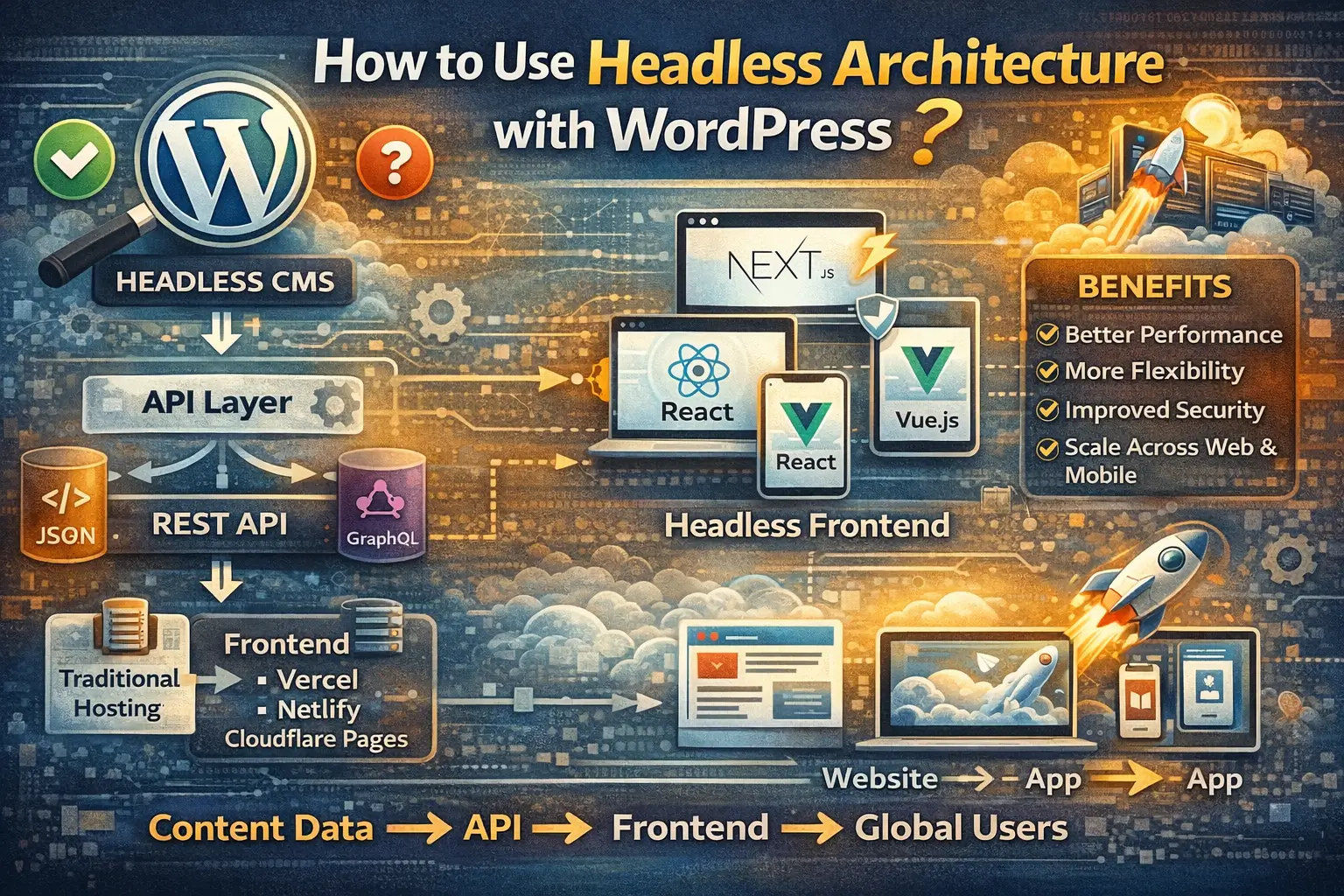
Key Takeaways:
- Headless WordPress separates the front-end (what users see) from the back-end (WordPress admin).
- This approach offers increased speed, flexibility, and developer freedom.
- Popular front-end frameworks include React, Vue.js, Angular, Gatsby, and Next.js.
- WordPress REST API or GraphQL can be used to fetch data.
- SEO considerations are crucial for headless implementations.
How to use Headless Architecture with WordPress?
WordPress is awesome. We all know it, we all (probably) love it. It's been the king of content management for years, and for good reason. But let's be honest, sometimes you need a little more *oomph*, a little more flexibility, a little more… control.
That's where headless WordPress comes in. It might sound intimidating, like you're about to perform brain surgery on your website. Don't worry, it's not *that* scary. We're here to guide you through it.
In this post, we'll cover what headless WordPress is, why you might want it, and how to get started without losing your mind (or your website!). Get ready to ditch the traditional and embrace the future of WordPress development!
What Exactly IS Headless WordPress?
The traditional WordPress setup (coupled)
Think of traditional WordPress like a delicious, pre-made sandwich. Everything's together: the bread (front-end – what you see and interact with), the fillings (content – text, images, etc.), and the preparation (back-end – WordPress admin). It's convenient, but you're stuck with that specific sandwich. You can't easily swap out the bread or add extra pickles (unless you're a ninja with a butter knife).
Breaking it down: Separating the front-end (the 'head') from the back-end (WordPress)
Headless WordPress is like deconstructing that sandwich. We're taking the bread (front-end) and the fillings (content) and separating them. The "head" (the front-end, the presentation layer) is removed. You're left with the fillings (your content) and the preparation area (WordPress admin) ready to be served in a completely different way.
WordPress as a content repository and API
In a headless setup, WordPress transforms into a powerful content repository. It's where you create, manage, and store all your content. But instead of directly displaying that content, it exposes it through an API (Application Programming Interface). Think of the API as a waiter who takes your order (request for content) and brings you exactly what you asked for.
Benefits of decoupling: speed, flexibility, developer freedom
Why go through all this trouble? Because decoupling offers some serious advantages:
- Speed: Front-ends built with modern frameworks like React or Vue.js are often much faster than traditional WordPress themes.
- Flexibility: You can use any front-end technology you want. Build websites, mobile apps, IoT devices – the possibilities are endless!
- Developer Freedom: Developers aren't constrained by WordPress theme limitations. They can use their preferred tools and workflows.
Why Go Headless? (The Pros & Cons)
Pros: Performance boost, omnichannel delivery, modern frameworks, security improvements
Let's dive deeper into the benefits:
- Performance Boost: Faster loading times lead to better user experience and improved SEO.
- Omnichannel Delivery: Deliver your content to any device or platform, from websites to mobile apps to smartwatches.
- Modern Frameworks: Leverage the power and flexibility of modern JavaScript frameworks.
- Security Improvements: By decoupling the front-end, you reduce the attack surface on your WordPress installation.
Cons: Increased complexity, potential SEO challenges (if not handled correctly), steeper learning curve for developers
Of course, there are also some drawbacks to consider:
- Increased Complexity: Headless WordPress requires more technical expertise.
- Potential SEO Challenges: You need to ensure your front-end is properly optimized for search engines. This usually involves server-side rendering or static site generation.
- Steeper Learning Curve for Developers: Developers need to be familiar with front-end frameworks and API integrations.
Choosing Your Front-End Framework
Popular options: React, Vue.js, Angular, Gatsby, Next.js
Now for the fun part: choosing your front-end framework! There are many great options available, each with its own strengths and weaknesses.
Factors to consider: team expertise, project requirements, performance needs
Consider these factors when making your decision:
- Team Expertise: What frameworks are your developers already familiar with?
- Project Requirements: What are the specific needs of your project? (e.g., complex interactions, dynamic content)
- Performance Needs: How important is performance? (e.g., high-traffic website)
Brief overview of each framework and its strengths
- React: A popular and versatile library for building user interfaces. Great for complex applications.
- Vue.js: A progressive framework that's easy to learn and use. Ideal for single-page applications and interactive components.
- Angular: A comprehensive framework developed by Google. Suitable for large and complex enterprise applications.
- Gatsby: A static site generator built on React. Excellent for performance and SEO.
- Next.js: A React framework for building server-rendered and statically generated websites. Offers a great developer experience.
Setting Up WordPress for Headless
API Options: REST API vs. GraphQL
WordPress offers two main API options: REST API and GraphQL.
Enabling the WordPress REST API
The WordPress REST API is enabled by default. You can access it by adding `/wp-json` to the end of your WordPress site's URL (e.g., `yourwebsite.com/wp-json`).
Exploring plugins for enhanced API functionality (e.g., WPGraphQL)
For more advanced API functionality, consider using plugins like WPGraphQL. WPGraphQL allows you to query your WordPress data using GraphQL, which is more efficient and flexible than the REST API.
Configuring CORS (Cross-Origin Resource Sharing)
CORS is a security mechanism that prevents unauthorized cross-origin requests. You'll need to configure CORS on your WordPress server to allow your front-end to access the API. This can often be done through a plugin or by modifying your server configuration.
Connecting Your Front-End to WordPress
Fetching data from the WordPress API using your chosen framework
Now it's time to connect your front-end to the WordPress API. Use your chosen framework's HTTP client (e.g., `fetch` in JavaScript, `axios` in React) to make requests to the API endpoints.
Authentication and authorization (if needed)
If your content requires authentication (e.g., for logged-in users), you'll need to implement an authentication and authorization mechanism. WordPress offers various authentication methods, such as JWT (JSON Web Token).
Displaying WordPress content on your front-end
Once you've fetched the data, you can display it on your front-end using your framework's templating system or components.
Example code snippets (basic data fetching)
Here's a basic example of fetching posts from the WordPress REST API using JavaScript's `fetch`:
fetch('https://yourwebsite.com/wp-json/wp/v2/posts')
  .then(response => response.json())
  .then(data => {
    // Process and display the data
    console.log(data);
  });
SEO Considerations for Headless WordPress
Addressing potential SEO challenges
SEO can be tricky with headless WordPress, but it's definitely achievable. The key is to ensure that search engines can properly crawl and index your content.
Server-side rendering (SSR) vs. static site generation (SSG)
Two common approaches to SEO in headless WordPress are:
- Server-Side Rendering (SSR): The front-end is rendered on the server before being sent to the browser. This ensures that search engines can see the fully rendered content.
- Static Site Generation (SSG): The entire website is generated at build time. This results in extremely fast loading times and excellent SEO.
Implementing proper metadata and schema markup
Make sure to implement proper metadata (title tags, meta descriptions) and schema markup to help search engines understand your content.
Ensuring accessibility and performance for search engines
Accessibility and performance are also crucial for SEO. Ensure that your website is accessible to users with disabilities and that it loads quickly on all devices.
Conclusion
Headless WordPress opens up a world of possibilities. It's not a magic bullet, and it definitely requires more technical expertise than traditional WordPress development. But the benefits in performance, flexibility, and future-proofing your website can be significant.
So, explore the options, weigh the pros and cons, and see if headless WordPress is the right fit for your next project! You might just be surprised at what you can achieve.